
Building a website sounds like something only developers or Computer Graduates do. But this is not the case. You just have to fill out a form , login, and click a few buttons, to have a working WordPress site live in about half an hour, or one.
I’ll Guide you through step by step, in simple language. Also, No coding needed. Yes it is Possible!
Let us start with the Basics , Why WordPress?
Before we start, a quick word on why so many people choose it. According to W3Techs data from July 2026, WordPress runs about 41.5% of all websites, and about 59% of the sites that use a known content management system. Its share has slipped a little from a 2025 peak near 43.6%, but nothing else comes close to it.
It’s popular because it’s free, flexible and beginner-friendly. You can use it for a blog, a portfolio, a business site or even an online store! And because so many people use it, almost any question you have already has an answer online.
But, should we use WordPress.com or WordPress.org? Because it might confuse you.
And not just you, this confuses almost every beginner, so let’s clear this up.
- WordPress.com is a hosted service. It’s easy to start, but the free version has limits on customization and shows WordPress branding.
- WordPress.org is the free software you install on your own hosting. You get full control, can install any theme or plugin, and the site is truly yours.
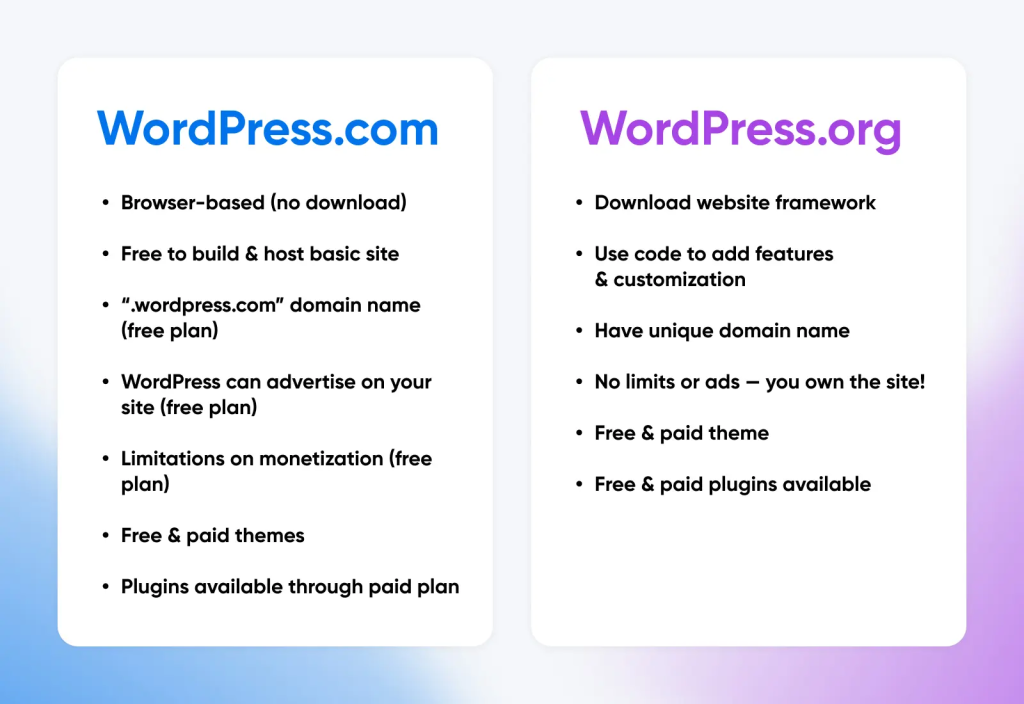
For a portfolio or professional blog, I’d go with WordPress.org (also called “self-hosted”). Employers like to see you have handled hosting and setup yourself, and you won’t hit limits later. That’s the version we’ll build here.
What you need before you start?
You need just three things:
- A domain name. This is your web address, like baregen.com
- Web hosting. This is the space on the internet where your site is seen,like the one you are reading right now.
- You need About 30 minutes to get done.
Prices for domains and hosting change often and vary by service provider, so compare a few options before you make a payment. Check the renewal price per year as some are click baits.
“In my case i have purchased domain for 1599rs. and hosting for around 1299rs.”
How to set up a website in 30 minutes?
Let us go through 6 simple steps:
| Step | Task | Time |
|---|---|---|
| 1 | First,choose and buy a domain of choice | 5 min |
| 2 | Pick hosting from your preferred website and install WordPress | 7 min |
| 3 | Log in and adjust basic settings as mentioned in detail below | 4 min |
| 4 | Choose a theme of choice | 5 min |
| 5 | Install a few essential plugins as mentioned | 4 min |
| 6 | Create pages and a menu and you are done! | 5 min |
Let us proceed step by step, in detail:
Step 1: Pick a domain name
Your domain name is how people find you online, so make sure you choose one that is clear and easy to remember.
You can use your own name if you are building a portfolio website. Keep the name brief and simple .Try to skip numbers and hyphens. Choose .com if you can.
.in for a Website where your target audience is in India.
Sometimes it may happen that your preferred name is already taken, if so , try adding a word such as “digital”. It might be available.
Step 2: Buy hosting and then install WordPress
Before signing up, check that the plan includes a free SSL certificate, which adds “https” and a padlock to your site’s address.
“While signing it , it will verify your digilocker account and only then you may proceed further.”
Store your login details in a safe place or take a picture of it. You will need them for the next step.
Step 3: Sign in and start setting up the basics.
Visit your web address and add /wp-admin at the end. Sign in with the username and password you created in the previous step. Your WordPress dashboard will open, where you can manage your site as you want.
Update a few settings:
In Settings, Go to General. Enter your site title and a tagline, then choose India as your time zone.
Go to Settings, then Permalinks, and select “Post name.” This creates clear web addresses that are easier to read and better for SEO.
The most important thing to note , Go to Settings, Go to Reading. Before your site goes live, check that “Discourage search engines from indexing this site” is unticked. If this option stays on, Google won’t list your site. One of the reason being, if you change your mind someday and decide to change the niche or content, google might get confused and end up not listing the site. That is a big no.
Step 4: Set a theme of choice.
Your theme controls how your whole site is going to look. Head to Appearance. Click Themes. Then choose Add New to see free picks.
Find one that loads fast. It must work well on phones. It needs fresh updates often. Strong user scores matter too.
Step 5: Add needed plugins
Plugins add new tools to your site. Go to Plugins. Hit Add New. Search for what you want. Install it and turn it on. Most new sites need just a few plugins
You can use an SEO plugin like Yoast SEO or Rank Math. It has good page titles and descriptions. It builds site maps too.
A security plugin keeps your login safe. It checks for risks.
Get a speed plugin. Pages open much faster with it.
Pick a backup plugin. You can fix the site if trouble hits.
You can Add a contact form plugin if you want visitor messages to reach you.
Keep your plugin list short , do not go with the flow as too many plugins might slow your site down. They bring extra risks. Old ones cause more problems. Add only what you need. Delete anything you stop using.
Step 6: Add your pages and menu
Open Pages > Add New and create the key pages for your site. A portfolio or blog usually needs:
- Home: Introduce yourself and feature your best work.
- About me: Share who you are and what you do.It should be all about yourself.
- Blog: Display your articles, attach some pictures.
- Contact: Tell visitors how to get in touch. Consider adding email.
- Write your first post
You are almost finished. Go to Posts > Add New
Don’t expect the design to be perfect at first. Publish your site, then make changes over time.
Conclusion
Building a WordPress site takes only a few basic steps: choose a domain and hosting plan, install WordPress, select a theme, add a few plugins, and set up your main pages.
You can launch a working site in around 30 minutes. Add content and refine the design over time as you learn and attract more readers. The quickest way to learn WordPress is by making a site, so you should start today!